Review draft: Violation types
Define types from your community CC&Rs, bylaws, and applicable procedures. Demo examples are not universal rules. This configures types; it does not send a violation.
1. Select + New type under Violation types.
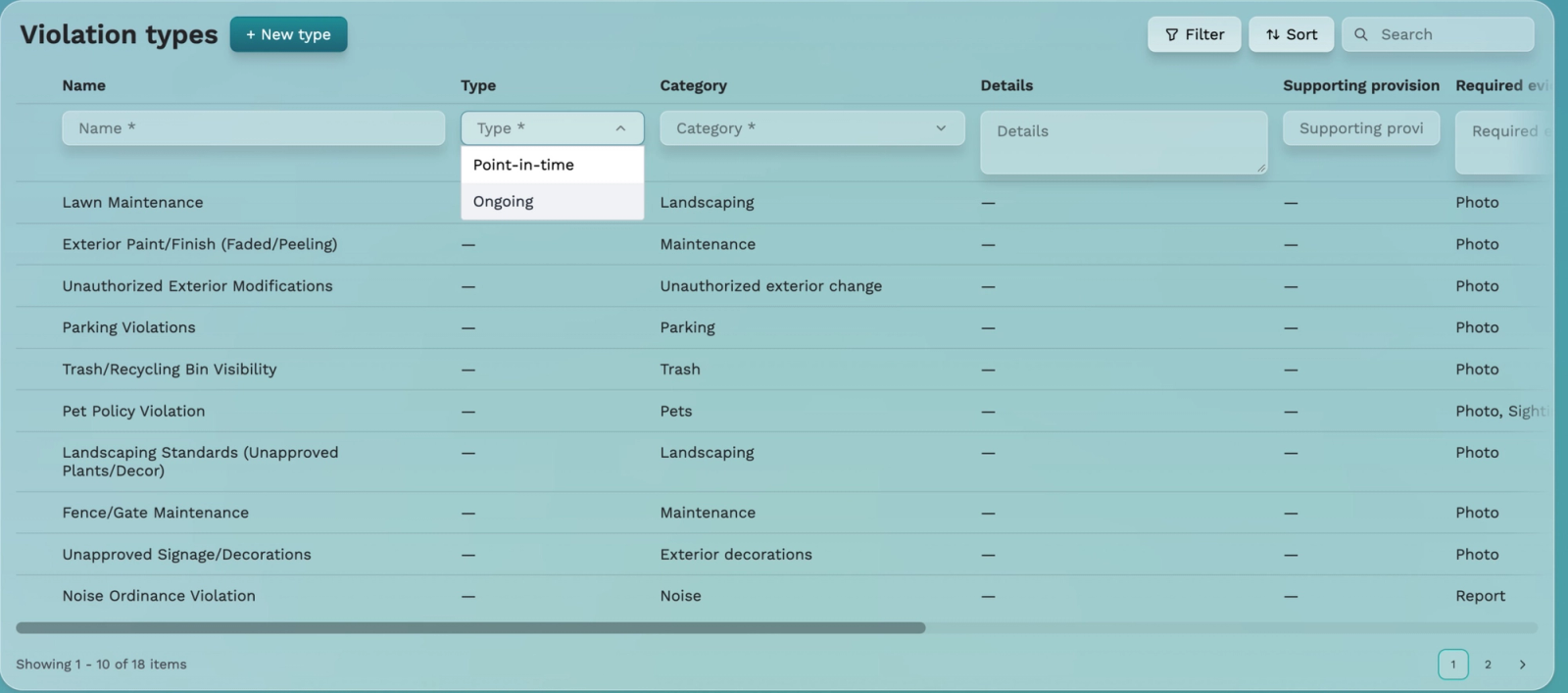
2. Enter Name and choose Type: Point-in-time for an incident (such as noise or trash left out), or Ongoing for a continuing condition (such as lawn, fence, or paint maintenance). Exact Type options were captured.
3. Choose Category and add Details.
4. Enter Supporting provision with a page, paragraph, or section of the governing rule.
5. Specify Required evidence and other applicable settings, then review before saving.
Joe described categories including commercial activity, exterior decoration/storage, landscaping, maintenance, noise, parking, pets, pool, trash, unauthorized exterior change/rental, and other. He described evidence such as sighting, photo, or report. Exact menu labels and selection behavior need review.
The table includes Timeline (ongoing only), Repeat occurrences, and a partly captured dispute column. Joe described a dispute window after notice to contest or remedy. Timing, relationship to remedy periods, enforcement, and fines are unverified. Expiry must not be interpreted as automatically imposing a fine.
Future crosslink: add the approved sending-a-violation guide when available. No URL is assigned and no violation was sent here.