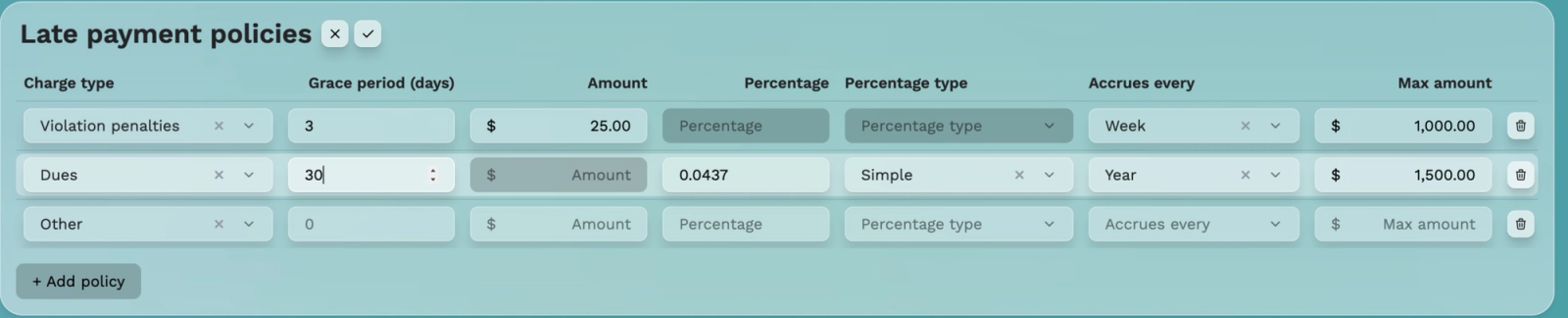
Review draft: Late payment policies
Configure policies that match approved community rules and applicable requirements. Demo values are not recommended rates or a legal-compliance guarantee.
1. Select the pencil beside Late payment policies.
2. Use + Add policy when another policy is needed.
3. Select Charge type, such as dues or violation penalties.
4. Set Grace period (days); Joe described days after the due date.
5. Configure a fixed Amount OR Percentage.
6. Where applicable, choose Percentage type and Accrues every.
7. Set Max amount, review, and save with the checkmark; X cancels.
The edit screenshot verified these field labels, row-removal controls, Add policy, and Save/Cancel. Joe described simple and compound percentage types.
Review needed before publishing calculation examples: percentage base, rate period, timing, rounding, compounding, caps, automatic application, effects on existing charges, and community authorization/legal applicability. No universal rate or state-compliance claim is made. No policy was saved or enforcement tested for documentation capture.