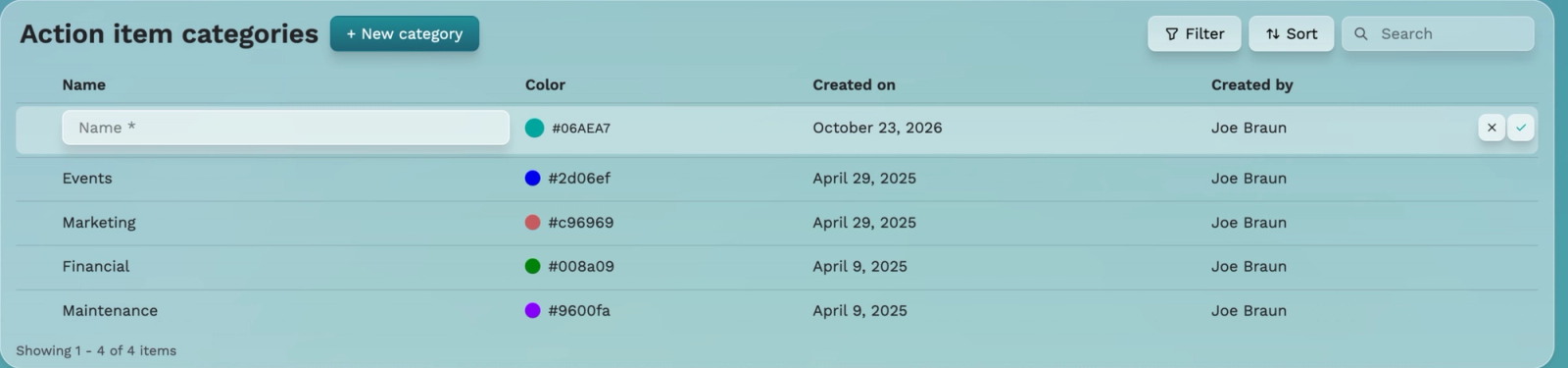
Action item categories
Categories organize calendar action items, including events, marketing, financial work, maintenance, and inspections. Creating a category does not create an action item.
Create a category
1. Select + New category in Community Settings.
2. Enter Name and choose a tracking Color.
3. Select the checkmark to save, or X to cancel.
Created on and Created by populate automatically, according to the walkthrough. Use the pencil to edit an existing category when available.
Linked category restriction
The Financial category had a disabled pencil. Its verified help reads: Entries with associated records cannot be modified. Joe explained this using associated calendar action items. Archive was visible but its effects were not demonstrated; confirm linked-record behavior before relying on it.
Illustration: category setup in Paradise Demo.